
Just a heads-up that all current Entrian products work with Visual Studio 2026. You’ll just need to run the Entrian installers again for VS 2026 to pick them up.
Attach-ChangeLog
Entrian Attach 1.5.2: Match the exit code
I’m pleased to announce Entrian Attach 1.5.2, which fixes two bugs:
- The exit code of the debugged process is now matched by the shim process, so the calling process sees the right exit code.
- Fixed an occasional crash when there was an error loading the settings.
You can download this new release from the download page or the Marketplace.
Support for Visual Studio 2022 in all Entrian extensions
I’m pleased to announce new versions of Entrian Source Search, Entrian Attach, and Entrian Inline Watch, all of which now support Visual Studio 2022.
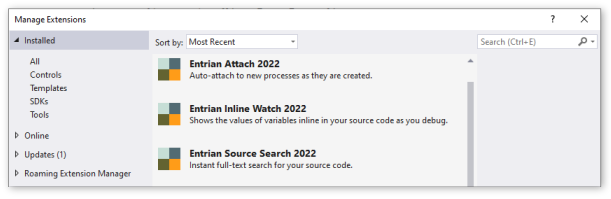
Entrian Source Search and Entrian Attach are shipped as single installers supporting all versions of Visual Studio from 2005 to 2022.
Entrian Inline Watch has three different versions, according to your Visual Studio version – see below.
Here are the new releases:
Entrian Source Search 1.8.2: Download / Marketplace.
Entrian Attach 1.5.1: Download / Marketplace.
Entrian Inline Watch 1.0.15: Download (all versions) / Marketplace (VS 2015-2019) / Marketplace (VS 2022).
Entrian Attach 1.4.9: Support for .Net Core debugging
I’m pleased to announce Entrian Attach 1.4.9, which supports .NET Core debugging – choose the CoreCLR debugger type in the configuration dialog:

You can download this new release from the download page or the gallery.
Full support for Visual Studio 2019
I’m pleased to announce new versions of Entrian Source Search, Entrian Attach, and Entrian Inline Watch, all of which now fully support Visual Studio 2019.
Full support for Visual Studio 2019 means that all three extensions use background loading, so they won’t necessarily load as soon as Visual Studio loads, or as soon as your solution loads. They will load as soon as you trigger one of their commands, but otherwise there can be a few seconds’ delay, before Source Search starts indexing, or before Attach will attach to newly started processes. Neither you nor I get any control over this, I’m afraid.
As well as support for Visual Studio 2019, these releases include the following fixes and features:
Entrian Source Search:
- You can no longer close a locked tab; you need to unlock it first. Thanks, Mary.
- Closing a tab that was restored from a previous session now closes the correct tab rather than some other one. Thanks, Marius.
- Fixed a crash when you start a search, right-click in the results before they update, then click a menu command after they update. Thanks, Jools.
- Fixed a bogus occasional ‘Error saving settings; Retry?’ message. Thanks Brett.
Entrian Attach:
- No longer fails to work if you have a file called ‘C:\Program’ on your C drive. Don’t do that, by the way.
- Installation now works properly if you have an instance of Visual Studio that only includes the build tools, as well as a full instance. Thanks, Vlad.
Here are the new releases:
Entrian Source Search 1.7.17: Download / Marketplace
Entrian Attach 1.4.7: Download / Marketplace
Entrian Inline Watch 1.0.10: Download / Marketplace
Support for Visual Studio 2019
I’m pleased to announce new versions of Entrian Source Search, Entrian Attach, and Entrian Inline Watch, all of which work with Visual Studio 2019 Preview.
These versions are not yet optimised for Visual Studio 2019, so they may cause deprecation warnings. There’ll be new versions available before the final release of VS 2019 that will fix those warnings.
Entrian Source Search 1.7.16: Download / Marketplace
Entrian Attach 1.4.6: Download / Marketplace
Entrian Inline Watch 1.0.9: Download / Marketplace
Entrian Attach 1.4.5: Fixed a bogus permission error
I’m very pleased to announce Entrian Attach 1.4.5, which fixes the following bug:
- If you have a conditional attachment rule set up for an executable, and that executable starts under a user account that your Visual Studio doesn’t have permission to debug, and the conditional attachment rule fails, you used to get a permission error. Now, Entrian Attach stays quiet. Thanks, Jools.
You can download this new release from the download page or the gallery.
Entrian Attach 1.4.4: Crash fix for super-long command lines
I’m pleased to announce Entrian Attach 1.4.4, which fixes a crash bug:
- If you have a conditional attachment rule set up for an executable, and that executable starts with a command line that doesn’t match the rule but is longer than about 900 characters, Entrian Attach no longer crashes. Thanks, Marc.
You can download this new release from the download page or the gallery.
Entrian Attach 1.4.3: Trim executable filenames
I’m pleased to announce Entrian Attach 1.4.3, which fixes one small but important bug:
- If you accidentally include leading or trailing spaces in your executable filenames, they are now stripped. Accidentally setting the thing to attach to
<space>myapp.exeno longer leaves you wondering why nothing works. Thanks, Honza.
You can download this new release from the download page or the gallery.
Entrian Attach 1.4.2: Attach to only one instance
I’m very pleased to announce Entrian Attach 1.4.2, which introduces one new feature:
- You can now configure Entrian Attach to only attach to one instance of your executable, and to ignore any subsequent processes, via “Attach at process start when… I’m not already debugging its exe”. Thanks, Honza.
…and fixes one bug:
- The child debugging rules are now obeyed when attaching to existing processes via
Attach Now, as well as when new processes start. Thanks, Jools.
You can download this new release from the download page or the gallery.