
Just a heads-up that all current Entrian products work with Visual Studio 2026. You’ll just need to run the Entrian installers again for VS 2026 to pick them up.
Inline-Watch-ChangeLog
Entrian Inline Watch 1.0.18: fix for VS compatibility
I’m pleased to announce Entrian Inline Watch 1.0.18, which is compatible with all versions of Visual Studio, not the just the most recent, which was erroneously the case for 1.0.17. Sorry about that!
You can download this release from the Download page or the Marketplace (VS 2015-2019) / Marketplace (VS 2022).
Entrian Inline Watch 1.0.17: Startup crash fixed
I’m pleased to announce Entrian Inline Watch 1.0.17, which fixes an intermittent startup crash. Thanks, Martin and Dmytro.
You can download this release from the Download page or the Marketplace (VS 2015-2019) / Marketplace (VS 2022).
Entrian Inline Watch 1.0.16: Fixes for value display
I’m pleased to announce Entrian Inline Watch 1.0.16, which fixes some problems with value display, mostly that C# and VB just stopped working in recent versions of Visual Studio 2022:
- Values are once again displayed properly for C# and VB in recent versions of Visual Studio 2022. Thanks, Kat and Anthony.
- Values are correctly displayed for the declarations of local variables and function parameters in C++.
- Values are correctly displayed for explicit ‘this’ access in C++, eg.
this->x. Thanks, Josh.
You can download this release from the Download page or the Marketplace (VS 2015-2019) / Marketplace (VS 2022)
Support for Visual Studio 2022 in all Entrian extensions
I’m pleased to announce new versions of Entrian Source Search, Entrian Attach, and Entrian Inline Watch, all of which now support Visual Studio 2022.
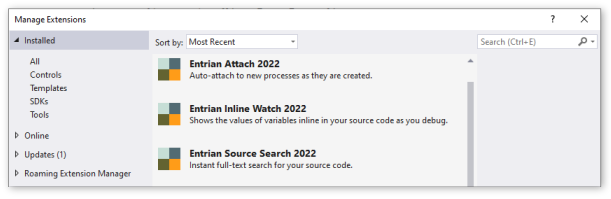
Entrian Source Search and Entrian Attach are shipped as single installers supporting all versions of Visual Studio from 2005 to 2022.
Entrian Inline Watch has three different versions, according to your Visual Studio version – see below.
Here are the new releases:
Entrian Source Search 1.8.2: Download / Marketplace.
Entrian Attach 1.5.1: Download / Marketplace.
Entrian Inline Watch 1.0.15: Download (all versions) / Marketplace (VS 2015-2019) / Marketplace (VS 2022).
Entrian Inline Watch 1.0.13: Suppress display for a type.
I’m pleased to announce Entrian Inline Watch 1.0.13, which adds one new feature:
- You can specify an empty format definition in the Object Formats list to suppress the display of values for a given type. Thanks, David.
and fixes two bugs:
- When pinning a popup window under a High Contrast theme, the pin icon is now clearly visible. Thanks, Martin.
- Where the name of a type contains a space, eg. a C structure like
struct _IO_FILE, you can now define an Object Format for it. Thanks, David.
You can download this release from here or get it from the Visual Studio Marketplace.
Entrian Inline Watch 1.0.12: Double-click to add a Watch entry.
I’m very happy to announce Entrian Inline Watch 1.0.12, which adds one new feature:
- You can now double-click a value bubble to add an entry for that expression to the Watch window. Thanks, Paul.
Download it from here or get from the Visual Studio Marketplace.
Entrian Inline Watch 1.0.11: Support for Visual Studio 2019 version 16.1.
I’m pleased to announce Entrian Inline Watch 1.0.11, which now supports Visual Studio 2019 version 16.1. The previous release was erroneously marked as only working with 16.0 rather than all 16.x versions. Thanks, Cahit and target2.
Download from here or get from the Marketplace.
Full support for Visual Studio 2019
I’m pleased to announce new versions of Entrian Source Search, Entrian Attach, and Entrian Inline Watch, all of which now fully support Visual Studio 2019.
Full support for Visual Studio 2019 means that all three extensions use background loading, so they won’t necessarily load as soon as Visual Studio loads, or as soon as your solution loads. They will load as soon as you trigger one of their commands, but otherwise there can be a few seconds’ delay, before Source Search starts indexing, or before Attach will attach to newly started processes. Neither you nor I get any control over this, I’m afraid.
As well as support for Visual Studio 2019, these releases include the following fixes and features:
Entrian Source Search:
- You can no longer close a locked tab; you need to unlock it first. Thanks, Mary.
- Closing a tab that was restored from a previous session now closes the correct tab rather than some other one. Thanks, Marius.
- Fixed a crash when you start a search, right-click in the results before they update, then click a menu command after they update. Thanks, Jools.
- Fixed a bogus occasional ‘Error saving settings; Retry?’ message. Thanks Brett.
Entrian Attach:
- No longer fails to work if you have a file called ‘C:\Program’ on your C drive. Don’t do that, by the way.
- Installation now works properly if you have an instance of Visual Studio that only includes the build tools, as well as a full instance. Thanks, Vlad.
Here are the new releases:
Entrian Source Search 1.7.17: Download / Marketplace
Entrian Attach 1.4.7: Download / Marketplace
Entrian Inline Watch 1.0.10: Download / Marketplace
Support for Visual Studio 2019
I’m pleased to announce new versions of Entrian Source Search, Entrian Attach, and Entrian Inline Watch, all of which work with Visual Studio 2019 Preview.
These versions are not yet optimised for Visual Studio 2019, so they may cause deprecation warnings. There’ll be new versions available before the final release of VS 2019 that will fix those warnings.
Entrian Source Search 1.7.16: Download / Marketplace
Entrian Attach 1.4.6: Download / Marketplace
Entrian Inline Watch 1.0.9: Download / Marketplace